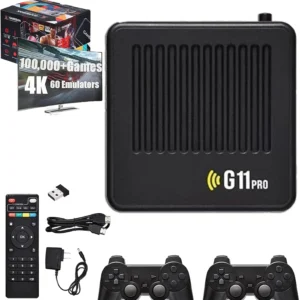
A retro game console is a simple way to bring classic-style gaming to a modern screen. Before choosing a model, check the display connections, the controller setup and the storage option that best fits how you plan to use it.
1. Check your TV connection
The G11 Pro is designed for displays with an available HDMI input. Check your TV, monitor or projector for a compatible HDMI port before ordering. If you use an adapter or receiver, confirm that it supports your display setup.
2. Choose your storage capacity
The G11 Pro is listed in three storage options. The listed prices are 64GB at $78, 128GB at $128 and 256GB at $158. Storage capacity is the primary difference shown between these variants; check the selected SKU and product details before ordering.
3. Review the controller setup
The product listing specifies two 2.4GHz wireless controllers. Follow the instructions supplied with your selected package to connect the receiver, power the controllers and complete pairing.
Compare G11 Pro Storage Options
Choose the configuration that matches your preferred storage capacity. Confirm the selected option in the product selector before adding it to your cart.
Make sure your TV or monitor has a compatible HDMI input.
Select the correct 64GB, 128GB or 256GB storage option.
Review the exact package contents and selected SKU.
Check destination availability and shipping information before placing an order.
Contact ProAllBit Support if you need to confirm compatibility or package details.
Retro Game Console FAQs
Will a retro game console work with my modern TV?
The G11 Pro is designed for TVs and displays with an HDMI input. Check that your display has a compatible HDMI port and review any adapter or receiver requirements in your setup.
What is the difference between the 64GB, 128GB and 256GB options?
The listed variants differ primarily by storage capacity and price: 64GB is $78, 128GB is $128 and 256GB is $158. Confirm the selected SKU and any batch-specific details on the product page.
Are wireless controllers included with the G11 Pro?
The current product listing specifies two 2.4GHz wireless controllers. Please check the package information for the exact contents of the selected option.
Do I need an internet connection for local gameplay?
Local gameplay is described as not requiring an internet connection. Any online or network-dependent functions may require connectivity.